

Introduction
If you’re running a website, chances are you’ve heard about XML sitemaps and robots.txt files. But understanding how they work together to improve your site’s SEO can be confusing for beginners. Don’t worry – this XML sitemap and robots.txt guide will break it all down in simple, easy-to-understand terms.
In short, an XML sitemap helps search engines like Google crawl and index your pages efficiently, while a robots.txt file tells them which parts of your site to avoid. Together, they act like a roadmap for search engines, making sure your content gets noticed while sensitive areas remain private.
Whether you’re running a blog, an e-commerce store, or a corporate website, this guide will help you understand the key concepts, set up both files correctly, and avoid common mistakes that can hurt your SEO. By the end of this article, you’ll have a solid understanding of how to use these tools to maximize your website’s visibility.
What is XML Sitemap and Robots.txt?
XML Sitemap
An XML sitemap is a file that lists all the important pages of your website in a structured format that search engines can read easily. Think of it as a directory or roadmap that tells Google where everything is on your site.
Key points about XML sitemaps:
- Written in XML format
- Contains URLs of your pages, posts, and media
- Can include metadata like last update date, priority, and frequency of changes
- Helps search engines discover new or updated content faster
Example snippet of an XML sitemap:
<urlset xmlns=”http://www.sitemaps.org/schemas/sitemap/0.9″>
<url>
<loc>https://www.example.com/</loc>
<lastmod>2026-04-08</lastmod>
<priority>1.0</priority>
</url>
</urlset>
Robots.txt
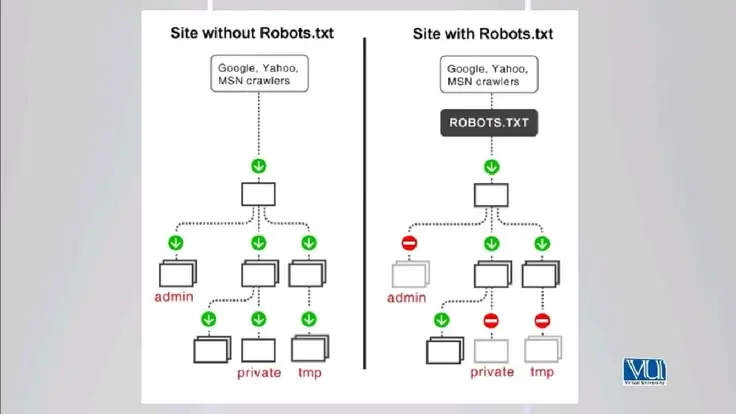
The robots.txt file is a simple text file placed in your website’s root directory that instructs search engine crawlers on which pages or directories they can access and which they should ignore.
Key points about robots.txt:
- Must be placed at https://www.yoursite.com/robots.txt
- Uses simple commands like User-agent and Disallow
- Helps prevent indexing of duplicate or private content
- Can improve crawl efficiency for large websites
Example snippet of robots.txt:
User-agent: *
Disallow: /admin/
Disallow: /private/
Why is XML Sitemap and Robots.txt Important?
Both files play critical roles in SEO. Here’s why:
- Improves Crawlability – Search engines use sitemaps to discover all your pages quickly, especially new or updated content.
- Controls Indexing – Robots.txt ensures that sensitive or low-value pages do not appear in search results.
- Enhances SEO Strategy – Properly configured files prevent duplicate content issues and boost page authority distribution.
- Saves Crawl Budget – Search engines allocate a limited number of pages to crawl on your site; robots.txt can guide them efficiently.
- Supports Large Websites – Big websites with hundreds or thousands of pages benefit greatly from clear sitemaps and robots.txt directives.
Without these files, your site might get crawled inefficiently, or some pages may not appear in search results at all.
Detailed Step-by-Step Guide
Step 1: Creating an XML Sitemap
- Choose a Tool
- For WordPress: Plugins like Yoast SEO or Rank Math
- For other websites: Online sitemap generators or manually create an XML file
- List Your Important Pages
- Include main pages, blog posts, and essential media
- Avoid including duplicate or low-value pages
- Add Metadata
- <lastmod>: Last modified date
- <changefreq>: How often the page changes (daily, weekly, monthly)
- <priority>: Importance relative to other pages (0.0 to 1.0)
- Save and Upload
- Name the file sitemap.xml
- Upload it to your root directory (https://www.example.com/sitemap.xml)
- Submit to Search Engines
- Google Search Console → Sitemaps → Add Sitemap
- Bing Webmaster Tools → Submit Sitemap
Step 2: Creating a Robots.txt File
- Create a Text File
- Use a plain text editor (Notepad or TextEdit)
- Name the file robots.txt
- Set Up User-Agents
- Target specific search engines or all (User-agent: *)
- Disallow Pages
- Example: Disallow: /admin/ prevents crawlers from accessing your admin pages
- Allow Pages (Optional)
- Example: Allow: /blog/ ensures certain directories are indexed
- Add Sitemap Link
- Helps search engines locate your sitemap:
- Sitemap: https://www.example.com/sitemap.xml
- Upload to Root Directory
- Must be accessible at https://www.example.com/robots.txt
Step 3: Testing and Validation
- Google Search Console: Test your sitemap and robots.txt
- Robots.txt Tester: Check for syntax errors
- Online Validators: Ensure XML structure is correct
Benefits of XML Sitemap and Robots.txt

- Improves site indexation speed
- Reduces duplicate content issues
- Helps search engines prioritize important pages
- Protects private or irrelevant pages from being crawled
- Optimizes crawl budget for large websites
- Supports structured SEO strategy
Disadvantages / Risks
- Misconfigured robots.txt can block entire site from indexing
- Incorrect sitemap URLs may prevent pages from appearing in search results
- Overuse of Disallow may limit crawl efficiency
- Manual updates are needed for dynamic websites
- Too large XML sitemaps may cause crawling delays
Common Mistakes to Avoid
- Blocking Important Pages – Don’t disallow pages you want indexed.
- Ignoring Sitemap Updates – Always update XML sitemap after adding new content.
- Syntax Errors – Ensure XML tags and robots.txt directives are correct.
- Multiple Sitemaps Confusion – Use a sitemap index file if you have many sitemaps.
- Not Submitting to Search Engines – Google won’t know about your sitemap automatically.
- Overcomplicating Robots.txt – Keep directives simple and clear.
FAQs
1. What is the difference between XML sitemap and robots.txt?
XML sitemap lists pages to be crawled, while robots.txt tells search engines which pages to avoid. Both work together to optimize crawling.
2. How often should I update my sitemap?
Update whenever you add or remove content, ideally automatically if using a CMS plugin.
3. Can I block Google from indexing my entire site?
Yes, with Disallow: / in robots.txt, but this is generally not recommended.
4. Do I need a separate sitemap for images and videos?
Yes, if your site has a lot of media content, separate sitemaps improve discovery.
5. Will robots.txt prevent pages from appearing in Google search?
It prevents crawling but not necessarily indexing. Use noindex meta tags for complete exclusion.
6. How large can an XML sitemap be?
Standard limit is 50,000 URLs or 50MB per sitemap. Use a sitemap index for bigger sites.
7. Is XML sitemap necessary for SEO?
Not mandatory, but highly recommended for faster and more efficient indexing.
Expert Tips & Bonus Points
- Always link your sitemap in robots.txt for easier discovery.
- Use sitemap index files for large websites.
- Regularly audit robots.txt to avoid accidental blocks.
- Include only canonical URLs in the sitemap.
- Use priority and change frequency wisely; avoid overthinking them.
- Keep robots.txt simple; complex rules may confuse crawlers.
- Monitor your crawl stats in Google Search Console to detect issues early.
Conclusion
Understanding XML sitemaps and robots.txt files is crucial for anyone looking to improve their website’s SEO. These tools ensure search engines can crawl, index, and rank your content efficiently.
An XML sitemap acts as a roadmap for search engines, helping them discover and prioritize your pages. Meanwhile, robots.txt guides crawlers away from private or low-value areas, optimizing your site’s crawl budget. Together, they create a robust SEO foundation that supports growth and visibility.
By following this XML sitemap and robots.txt guide, you can avoid common mistakes, maximize indexing efficiency, and improve your chances of ranking higher in search results. Whether you are a beginner or an intermediate website owner, investing time in these files will pay off in better traffic, more visibility, and a stronger online presence.
